Every post comes from something I've done on a real project. AI tools, development approaches, how I actually build things. You're getting a curation of my taste, not takes on stuff I don't use. Subscribers also get extras: things that went wrong, how my thinking about AI is changing, hacky workflows I use every day, and the occasional personal update. Stuff I share with subscribers because it's a little too personal or unpolished to blast across the internet.
VLM OCR for hard documents
|
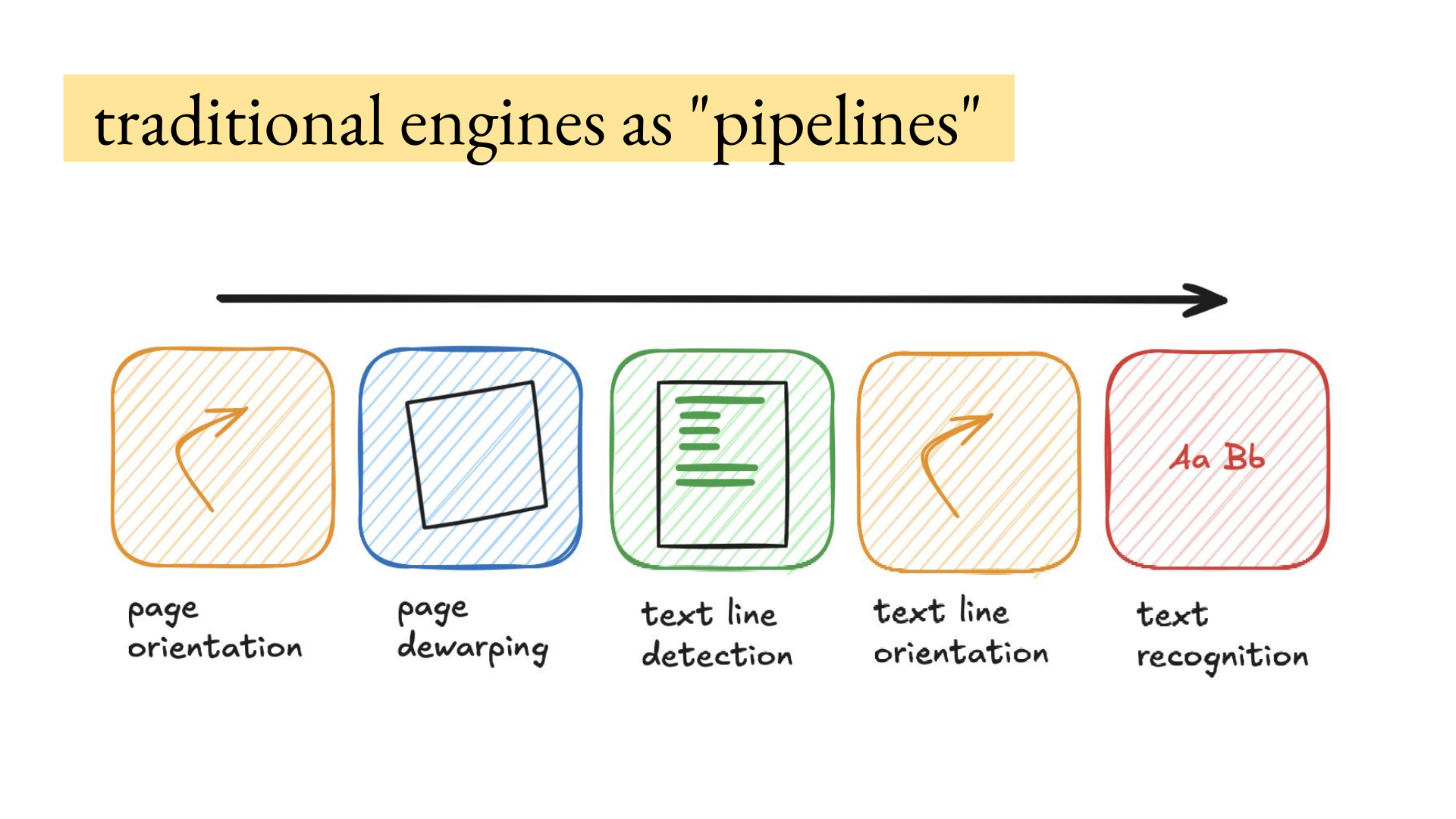
Hey, How to get data out of documents is the most common thing I get asked about privately, because if the source data extraction is wrong everything in the product will be wrong downstream. There's so many edge cases related to the reading order, tables, images, images with text inside them, scans, handwriting that is a picture embedded in a scanned document, etc. I hosted Joe Barrow for a deep dive on VLMs (vision language models) for OCR. He has processed hundreds of millions of document pages and now works in Adobe’s PDF research lab. He compared traditional OCR pipelines with LightOnOCR, Chandra, and MonkeyOCR, then walked through the tradeoffs around quality, cost, latency, licensing, and self-hosting. It was a private talk in our paid community, but I decided to make it publicly available because I think a lot of people can benefit from this info. VLM OCR for Hard Documents with Joe BarrowI hosted Joe Barrow for a talk on VLM for Hard OCR Documents. This post covers what he shared about how these models work, where they fail, and how to choose one. It is the written version for those who prefer that, though you really should watch the talk because it's very good. OCR is not just getting the text on a page. Depending on the downstream task, you may also need text structure. Is this a heading, part of a paragraph, or a cell in a table row? The reading order and document layout could matter as well. Two paragraphs might be in a two-column layout. Data might be in figures, charts, and tables. You can ignore figures, capture their bounding boxes, deconstruct a chart into a pandas DataFrame or another useful format, or add a caption. OCR also has to handle all kinds of document crap: multiple pages embedded in one page, scans, handwriting, and general document crust. Medical records often contain a printed and scanned page inside another printed and scanned page. At some point, you lose most of the original content, and the OCR engine still has to handle it. This is a more research-heavy discussion of VLMs for OCR: how to deploy them and figure out when and where to use them. There’s another talk on how to choose an OCR model, set up the infrastructure, and decide when to self-host versus call an API. VLMs for OCR are what Joe does and also a passion of his. He used to be the head of machine learning at Pattern Data, where the team processed several hundred million pages of documents. He is now a research scientist in Adobe’s PDF research lab (Adobe is THE document company). Why VLMs for OCR?Until 2022 or 2023, the most popular OCR engines were pipelines. Think Tesseract, PaddleOCR from Baidu, or the first Surya model that Vic released from Datalab. PaddleOCR is five models. The first detects page orientation: is it upright, rotated 90 degrees, or rotated 180 degrees? If it’s a scan, you can dewarp the page and get it square again. Then text-line detection finds rectangles of text, and the pipeline makes sure each line has the right orientation. Many pages contain text in multiple orientations, so the pipeline must determine the orientation of each line before recognition. AWS Textract doesn’t allow text in multiple orientations. AWS Rekognition, its scene text recognition engine, returns up to 100 words per page but supports lines in multiple orientations up to 90 degrees apart from the upright orientation. That means a page can have text at 0, 90, and 270 degrees.
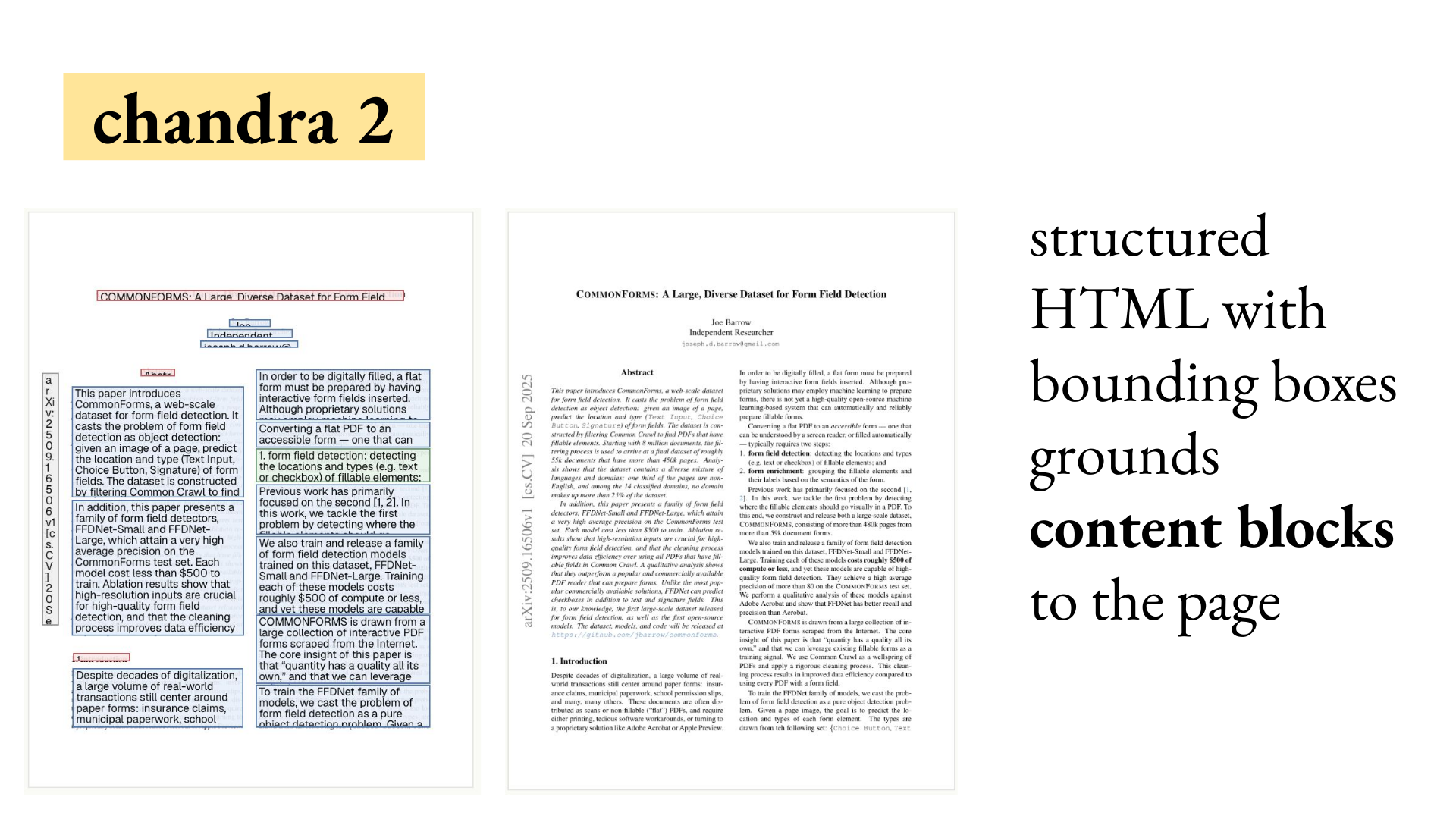
Isaac: Is that primarily for charts and graphs and legends and labels and things like that? You would think so, but many documents have text in places and orientations you wouldn’t expect. A simple example is an arXiv page with an arXiv header running along the side at 90 degrees. Charts are another common example, or pictures of medical devices. A device could have serial numbers in two orientations while the whole image was upside down. You need to handle the upside-down image and both orientations of text. Traditional pipelines run these models one after another and return raw text grouped by line. Depending on how you train them, they can handle different languages, scans, handwriting, and document crust. They don’t provide text structure, reading order, document layout, or handling for figures, charts, and tables. These models end up being very fast, because they’re ~ 10 to 25 million parameters, but they’re very limited. There’s no global view at decoding time. There’s also a risk of cascading pipeline errors. If your text recognizer is wrong, then your detector is going to be very wrong because it’s looking at something that’s not text. Then you need more stages to handle the document structure described above. To extract a table, you need a table detector followed by a table structure detector. The IBM Docling pipeline uses a table structure parser that examines chunks of a table and predicts whether each cell merges with the cell to its right or below it. It uses those predictions to reconstruct the full table. Each capability adds another stage to the pipeline. VLMs can handle them as a single run of structured text, which gives the model a global view at decoding time. The VLM always sees the whole page. If someone writes the same word slightly differently on two lines, the model can use the rest of the page to infer that they are probably the same word. It may get both right or both wrong. A pipelined recognizer doesn’t see the rest of the page and can get one instance wrong simply because it is less clear. Most VLMs are not pipelined. Some newer approaches introduce pipelines to reduce latency, but most models released since 2025 take a single image and return structured text. The VLM can be trained to generate Markdown headers, parse tables, and return bounding boxes around figures. Its output already contains the document structure. That comes at a cost: pipeline components might have 15 million parameters each, while VLMs start around a billion parameters. The best model on olmOCR-Bench has 32 billion parameters. Joe questioned whether a model that large still counts as an OCR model and could not think of a case when he would want to use one. As an example of what this looks like, Chandra from Datalab takes a single image and outputs a structured representation of the page. It uses a format called Qwen-HTML with a data-bbox attribute on each HTML tag. That attribute outputs the location on the page normed to 0 to 1000 and then the text in that location. The sideways archive box becomes a The same output can parse tables, locate figures, and caption them.
Isaac: When you say reading order, do you mean the first column on the left comes before the second column rather than reading straight down the page? Reading order is how you handle complex layouts. This case isn’t a particularly complex layout, and you could use a simple layout engine to identify two columns. But then you get into old newspapers with three, four, or five columns, article chunks that start in one column and end in another, and different articles on the top and bottom of the page. Suddenly reading order becomes a much harder problem that needs some semantic understanding of the page. Reading order can also be ambiguous, and sometimes you don’t want things like a header on the side. Those are considerations for how you train the VLM, but training normally pretends that the model can generate one ground-truth reading order from the image of a page. How VLMs workA VLM divides an image into patches sized for the ViT, or vision transformer. These can range from 16 x 16 down to 4 x 4. The transformer generates a vector for each patch. Those vectors are projected into the LLM decoder’s token space and treated as normal tokens. With a Qwen backbone, for example, you can fine-tune the ViT to generate tokens for Qwen. You can also include a prompt telling the OCR model whether to output layout or figure bounding boxes. The model then generates its output autoregressively, usually token by token. The result can be plain page text, bounding boxes, or a structured layout.
Isaac: If you don’t need the architecture details, think of the model as a black box. The page is broken into small pieces and fed in along with your prompt. Magic happens, and the output comes out. Focus on how the input is broken up, what gets sent in, and what comes out. That black-box view is useful: these models take in patches and generate tokens in the ViT space, or take in tokens and generate tokens in the LM case. Many interesting research questions fall out of this. The DeepSeek-OCR paper, for example, asked whether the number of tokens output by the vision transformer could be compressed. If the vision transformer generates 16 x 16 patches and one token per patch, an image can become one or two thousand tokens, which can be expensive. Do you need all of those tokens? Can you reduce that number with a projection or attention layer? That’s what the paper examined. Three representative OCR VLMsThree models show the main architectural patterns. LightOnOCR-2 comes from LightOn AI, a French company that works on retrieval and also has this family of OCR models. Chandra comes from Datalab, which has a hosted OCR pipeline that accepts PDFs. MonkeyOCR comes from a Chinese lab and takes a different approach. LightOnOCR-2LightOnOCR follows the VLM architecture described above: the ViT patchifies an image, generates tokens, and feeds them to a standard Qwen3-0.6B decoder with 600 million parameters. They took the ViT from Mistral, specifically the Ministral model. VLMs are normally jointly trained, with a fixed decoder and ViT trained on billions of image-text pairs. LightOnOCR instead Frankensteined two independent models together. It works because the Mistral ViT is strong on documents and Qwen 3 is a strong decoder. They trained it on 16 million pages to output Markdown in reading order. The output contains the Markdown header, its content, and then the H2 that declares the content type. Because it’s a 1B model that only outputs Markdown, it is cheap and efficient to run. In Joe’s experience, it cost about 30 cents per thousand pages. LightOn claims about 10 cents, but Joe thinks that requires several tricks and cheaper compute than he had access to. The model takes in a single page image and outputs Markdown token by token.
Isaac: Okay. So it’s just Markdown. Is it also inferring the reading order and putting the content in that order? Is it putting tables into Markdown tables? Does it handle images somehow? It converts tables into HTML as part of the training pipeline. For images, the model can mark the image and include a caption. A variant called LightOnOCR-2-1B-bbox generates only the image bounding boxes. LightOnOCR also converts formulas into LaTeX. Everything is generated in the model’s best-guess reading order. Joe has run this on many different reading orders and found it robust and high quality, especially for the size. It does have issues. The kinds of errors that happen with VLMs are very different from pipeline OCR models. Even though it was trained to handle blank pages, a semi-blank page will sometimes trick the model into hallucinating boilerplate HTML. That becomes a question of how to fine-tune the behavior out of LightOnOCR. This error generally wouldn’t happen in a pipelined model because the text recognizer would fail. But if the text detector doesn’t fail and detects fake text on the page, you get a lot of crap as well. Joe saw this often in crusty scans at Pattern, where Textract would return only the word “the” from a non-textual region. Chandra 2
Chandra 2 follows the same formula as LightOnOCR, but starts with raw Qwen 3.5. They use several tricks to reduce it to a 5B model. The model outputs a Qwen-HTML structure where each HTML element has a The labels distinguish page headers from section headers, and the bounding boxes are quite accurate when mapped back onto the page. The training recipe is straightforward: send in a page image and train against its HTML representation. For tens of millions of pages, those representations can come from a combination of existing OCR models, born-digital page information, and heuristics. Humans may clean up the validation set. The underlying VLM is still straightforward: page image in, tokens out. Qwen-HTML generates many more tokens than LightOnOCR’s sparse representation of the page text. In return, Chandra produces richer structure grounded in regions of the page. That structure requires generating all of the additional HTML tokens. Qwen doesn’t have tokens for two-digit numbers, so each digit in a bounding box can become an individual token. In return, you get the page text, text structure, reading order, document layout, and handling for figures, charts, and tables. Chandra captions figures and charts and parses tables into HTML. With good training, it also handles different languages, scans, and crusty content. A traditional OCR pipeline would need additional stages for document layout, figures, charts, and tables. When rendered on the page, each block contains its text and content. The localization is surprisingly good. For several years, Joe did not believe VLMs could localize as well as object detectors, despite a co-worker arguing that they could. His co-worker was right. He is now convinced that VLMs can localize and detect objects well as long as the page isn’t too dense. You won’t get word or character bounding boxes, but you can get content-block bounding boxes. MonkeyOCR
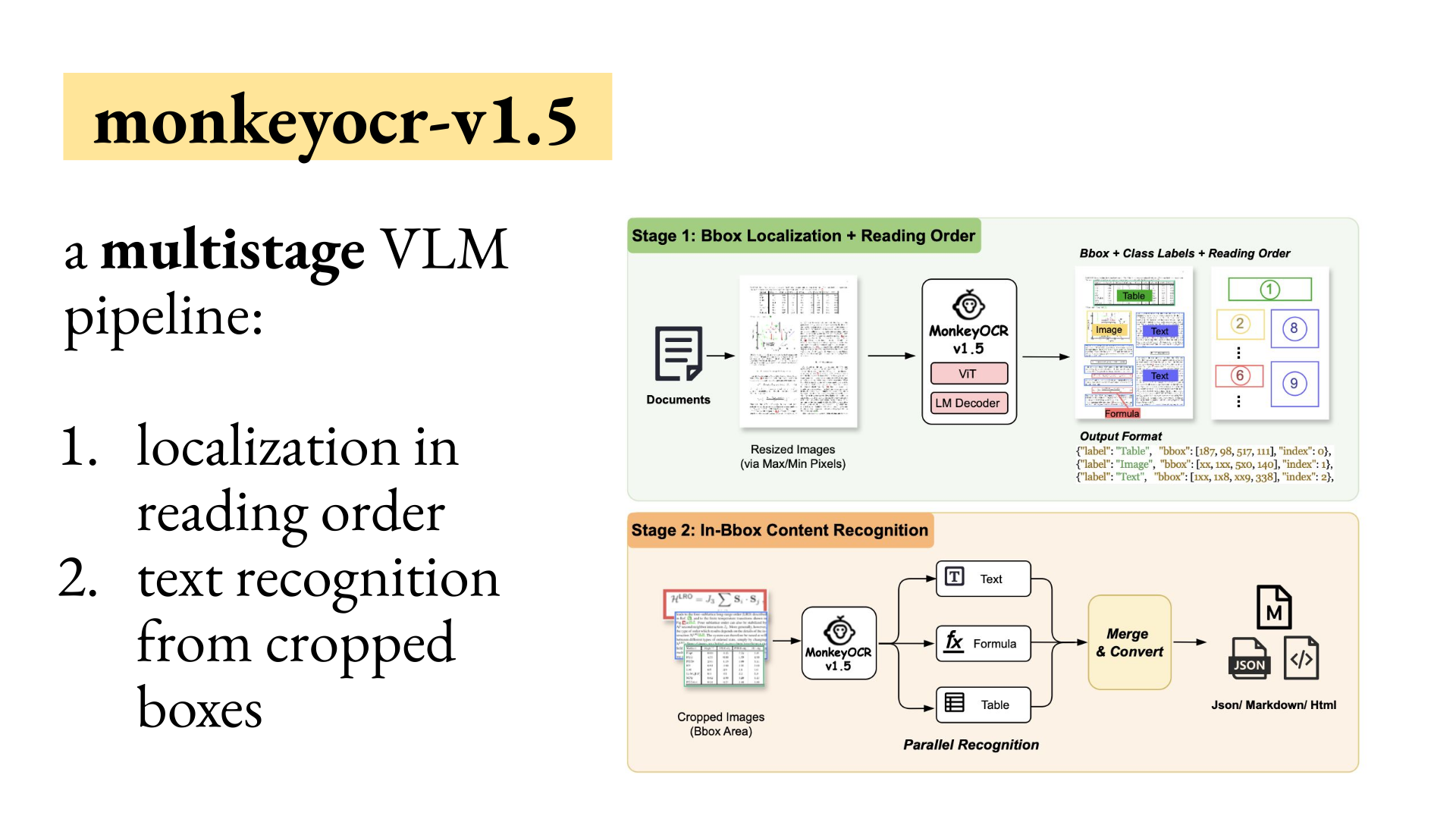
MonkeyOCR v1.5 comes from a Chinese lab and uses an approach Joe has so far seen only from Chinese labs. One issue with VLMs, especially for OCR, is that the cost of generating tokens isn’t linear. Cost and memory are closer to quadratic because each new token must attend to every previous token. Several architectural changes try to address this. Qwen 3.5 uses linear retention in some layers, but using it in every layer hurts performance. Another option is to turn the VLM into a pipeline and recover much of that latency. MonkeyOCR first sends the document image through the VLM with a prompt to generate typed regions in reading order and ground them to the page. The model returns crop locations for tables, images, paragraphs, headers, and formulas. You crop each region and send it back to the same model with a new prompt: OCR this content, parse this formula, or convert this table into HTML. Instead of processing the entire page at once, the model handles one paragraph, formula, or table at a time. You lose the global view of the document and some performance relative to single-shot OCR VLMs. Latency drops because the model can generate all of the paragraphs in parallel instead of one after another. MonkeyOCR v1.5 is not the only model to use this approach. The Dolphin OCR family does as well. These models tend to perform worse and have become less popular as people move toward more efficient straight-decoder architectures, but they offer substantial speed gains. A paper on hierarchical speculative decoding uses this approach to speed up single-shot OCR models.
How to choose a VLM
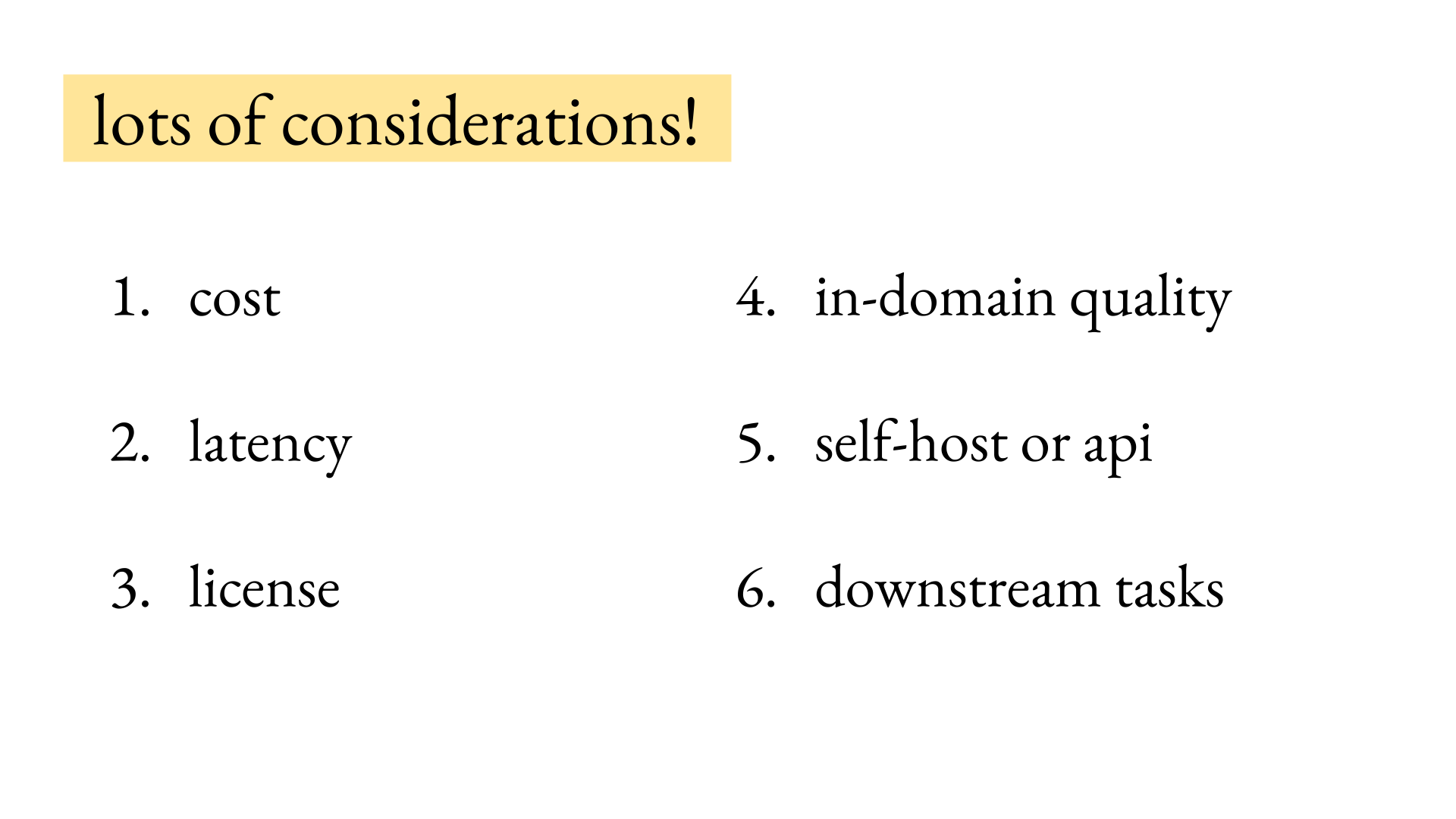
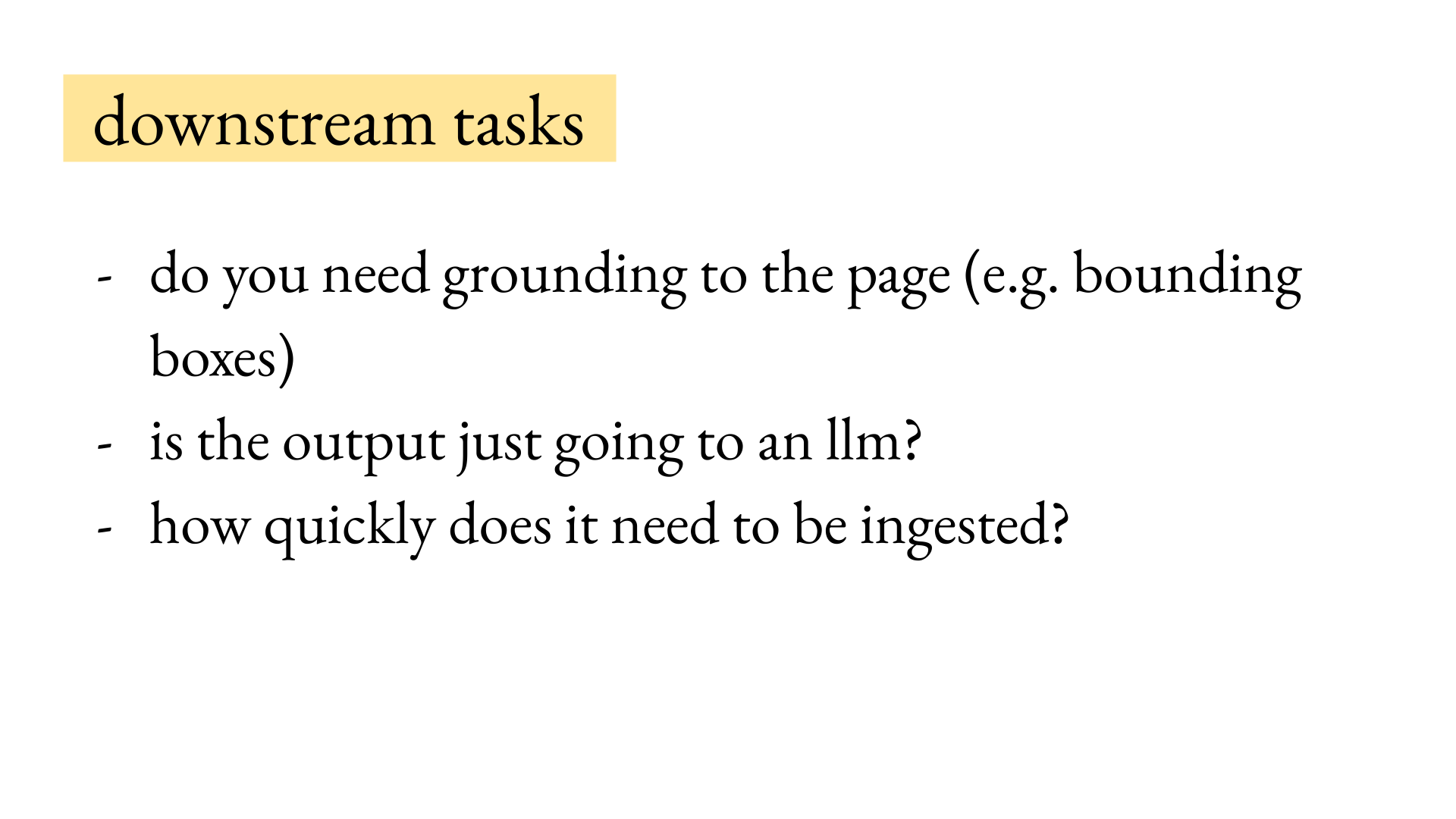
Downstream needsThe biggest consideration for running a VLM for OCR is the needs of the downstream task. Do you need grounding on the page, such as bounding boxes? Some companies are convinced they need character-level bounding boxes. In Joe’s experience, content-level bounding boxes, or at worst line-level boxes, are almost always enough. Ask whether you even need grounding on the page, because you’re paying for all those extra tokens. Are you okay with just getting all the content from the page? For instance, Joe’s team recently released a big dataset where they collected nearly all the local laws in the United States and processed them from millions of PDF pages. In that case, they knew they were never going to touch those PDFs again. They needed only the content, so they chose LightOnOCR because it was cheap, fast, and provided structured content in reading order. If the output is going to an LLM, you almost never need the grounding. The next question is what type of data you’re processing. How quickly does it need to be ingested? A real-time document system that needs results within seconds sharply constrains your model choice. With a one-hour, two-hour, or even 24-hour SLA, you can batch large quantities of documents and run a larger, higher-quality VLM.
Test your own dataAnother consideration is in-domain quality. Many open VLMs are trained exclusively on born-digital documents because the training data is easy to generate. You can scrape millions of PDFs, pull out their text, approximate each page in HTML, and train an OCR model. That works until you feed the model handwriting, a bad scan, medical documents, or something else that isn’t common on the open internet. To decide whether a VLM is useful in your case, run it on your data and inspect the outputs. Looking at 50 to 100 pages will tell you whether the model is likely to work. If you do that, you’re ahead of 99% of people who are yoloing whatever API is cheapest or easiest to set up. If Textract is poor in your domain, feeding all your documents through it can cost substantial downstream performance in a RAG system. Looking at your data is also valuable for researchers. Many of the best research ideas come from seeing exactly where a model fails. AI2 noticed that formula parsing into LaTeX is difficult to evaluate because multiple TeX equations can render identically, while two similar-looking equations can render very differently. They developed a rendering-based reward for OCRing formulas and TeX equations and got a large boost in formula parsing. LightOnOCR used the same reward structure in training and handles formulas much better. Looking at the data can reveal research techniques that other people haven’t considered because they haven’t seen how badly the model handles formulas or empty pages. Cost and latencyPrices and licenses in this section were current when Joe gave the talk. For cost, PP-OCRv6, PaddlePaddle’s Apache-licensed pipeline OCR, is as close to free as you can get. It will run on your phone, much like the OCR built into a Mac. If you want the page structure, a fine-tuned one-billion-parameter model on good infrastructure should cost 10 to 30 cents per thousand pages. That’s what Joe’s team saw with LightOnOCR-2-1B on Modal, which typically costs about twice as much as prepaying for H100s through AWS. Cloud APIs from Google, AWS Textract, and Azure’s OCR service cost between roughly 50 cents and $2 per thousand pages. Textract is $1.50 per thousand pages at low volumes. After a million pages in one month, it drops to 60 cents per thousand pages. Hosted VLM providers typically offer high-quality OCR at a higher API price. Mistral’s OCR 4 cost $4 per thousand pages. Datalab, which makes the open Chandra and Surya models, charges $4 per thousand pages for its fast service. Its accurate service costs $10 per thousand pages, the highest price in this comparison. Before paying that, consider whether your task needs that level of accuracy or can tolerate errors from a cheaper model or API. A self-hosted VLM typically takes a few seconds per page, slower than a pipeline model. Joe has been working on faster decoding and gets about a 1.5x speedup with LightOnOCR without degrading quality. He hopes to write a paper on that soon. He also released a speculative decoding head for Chandra 2 that gets about a 1.5 to 2x speedup at small batch sizes. You can plug that into Chandra from Hugging Face and get a pretty free latency speedup. Licenses and hostingLicense is a major consideration because each VLM is released under different terms. For instance, the models released from Datalab, Chandra and Surya, have an OpenRAIL-M license. It is free for you if your organization makes less than $2 million a year or has raised less than $4 million. But once you pass that, you have to pay pretty high prices even to self-host your OCR engine, because at that point you’re competing with their own hosted models. Many other open VLMs use Apache or MIT licenses. LightOnOCR is Apache licensed. GLM-OCR, a recent popular model, is MIT licensed. A startup does not want to end up on the wrong side of a non-commercial license. Some people have an “it’s totally okay” attitude, but check the licenses of every model and piece of software you use. If you are not cost-constrained, use an API. Self-hosting can still make sense, and infrastructure companies such as Modal, Baseten, and Lambda have lowered the bar. Joe has extensive experience with Modal, where containers scale to zero. Modal makes it easy to self-host many of these models. Joe and Pattern’s founders have discussed what they would do if they started over knowing the scale Pattern would reach. They would probably self-host. When Pattern started, transformers and BERT existed, but almost none of today’s OCR VLMs did. He has tracked roughly 50 VLM releases over the last six years. QuestionsHow do newer OCR models compare?
Isaac: You mentioned tracking about 50 releases. Is that something you can show? What are you tracking them against, and what are these releases getting better at—cost, latency, or accuracy? Joe is writing a survey of VLM OCR and trying to release a friendly version chunk by chunk. He has tracked models since 2021, starting with TrOCR, the first transformer OCR model. That replaced the text recognizer with a transformer, but since then the field has seen real OCR models that do the full page thing. Many are built on the Qwen2.5-VL releases. Two main benchmarks compare them. Some models report performance on AI2’s olmOCR-Bench. A different, almost disjoint subset reports on OmniDocBench v1.5. OmniDocBench is a Chinese and English benchmark, whereas olmOCR-Bench may be English only. For models that report both scores, and models he has run on the other benchmark himself, the correlation is strong. A model that performs well on one typically performs well on the other. The survey also tracks cost, localization, whether the model is multi-stage, performance, and training. MonkeyOCR and Dolphin are multi-stage. Most models with localization return layout boxes, but an older Microsoft model called Kosmos could return line boxes. It came from a period when OCR pipelines commonly used line boxes. Training is one of the biggest variables: how you collect the data, what size it is, and how you do it efficiently. What should you store from a large OCR batch?
Question: Could you tell us more about the corpus of local laws and how you store it? You mentioned it went through LightOnOCR, so did you keep the Markdown? Joe recommends taking all the PDFs, rendering all the pages at once, and storing those rendered images long enough to process them. His team stored seven million images, which ended up being a few terabytes of image data, before running them through LightOnOCR. Once you’ve done that, as long as you retain the PDFs, you can delete the images and save those several terabytes. Keep all the Markdown per page and the post-processing that merges pages and extracts the laws separate. That pipeline is not fixed. The dataset contains cases where two laws were merged but should not have been. Which PDF renderer should you use?
Question: How did you go from PDF to image? What did you use for that processing? This choice also involves software licensing. Many people looking for PDF-to-image software reach for PyMuPDF. Joe would not use it inside a company without understanding the license. PyMuPDF is maintained by Artifex and uses AGPL-3.0 for open-source projects, with separate commercial licenses for proprietary applications. There is a better open option called Are VLMs a good fit for architectural drawings?
Question: We are dealing with architectural drawings and PDFs of home plans. A plan could have 100 pages, but these are one-off jobs, so scale is not a major constraint. The plans can change over time, and some feel like detailed drawings layered on top of each other. Have you worked with anything similar? Architectural drawings are the bane of Joe’s existence. He used to work on form-field detection, including automatically placing PDF form fields. Architectural drawings trigger vision systems constantly because they contain so many lines. You have to add a lot of negative examples to stop that from happening. Some drawings also have checklists that you need to catch. A VLM for OCR might put you at a disadvantage here because many models will return the whole drawing as one figure box and omit its contents. dots.ocr from RedNote attempts to deconstruct and caption images and turn charts into structured output. At a small enough scale, you may be better off taking the figure box and sending the crop to Gemini or another larger VLM with a good prompt. In Joe’s experience, Gemini is a surprisingly good document processor. He has experiments from his job that he can’t show, but it is far better at handling document images than Claude and GPT. It might be bad at agent coding, but it is good with documents. Gemini 3.5 Flash was even better than 3.1 Pro, so you could save money and use Flash. How should OCR handle slides with text and images?
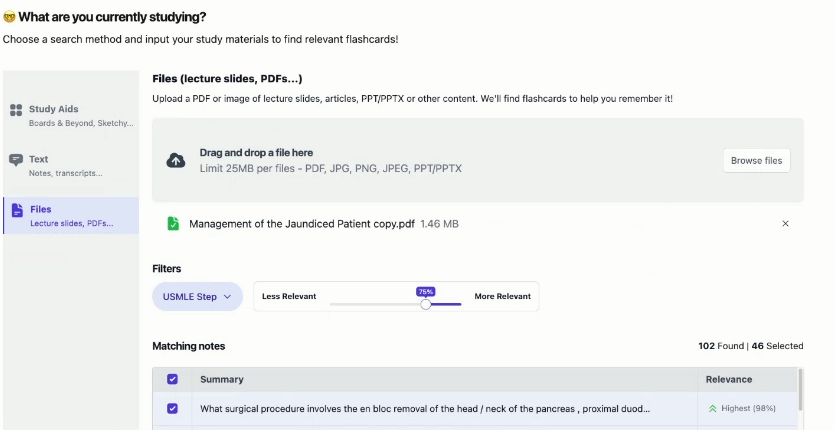
Isaac: Another member needs to process medical slides and find the relevant flashcards. The slides contain text, images, and repeated cruft such as logos and headers. Some images matter only in the context of the nearby medical material, and the output has to remain scoped to what the student should study. How would you approach this document? Document layout analysis typically classifies page numbers, repeated logos, and templates as artifacts. Whether they appear in the output depends on the model. LightOnOCR tries to remain faithful to the page and returns all of them. Chandra and Surya drop artifacts by default and are tested on their ability to do so. For slides with repeated cruft, one of those models may save you from removing it later. The harder choice is whether to OCR the content inside an image or return only the image’s bounding box. A pipeline can detect the full image, then send any crop containing text through PaddleOCR to recover the text boxes that the original VLM omitted. dots.ocr attempts to return text from inside images by deconstructing them, so you may have a better shot with that. When you aggregate the content, you’re limited by the quality of the orchestrator model. The image of the eye will probably have a caption. You can feed that caption to the orchestrator and let it reason about whether the eye belongs with the nearby material about jaundice. Instead of working only with the images, you can pass the caption or the cropped region and say, “Any of these image crops could become a flashcard.” |
Isaac Flath
Every post comes from something I've done on a real project. AI tools, development approaches, how I actually build things. You're getting a curation of my taste, not takes on stuff I don't use. Subscribers also get extras: things that went wrong, how my thinking about AI is changing, hacky workflows I use every day, and the occasional personal update. Stuff I share with subscribers because it's a little too personal or unpolished to blast across the internet.

I’ve been working on extracting data from documents, and I've shared a bunch to of stuff on the topic Hosted talks on OCR and VLMs to get tables, text, images, etc. out of documents Mini examples of which models and pipelines work in specific cases Retrieval on PDF documents to grab specific source data Antaripa Saha worked on #3 as part of her work in the AI Product Engineering Club. She compared keyword search, dense OCR, visual embeddings, multivectors, and reranking on complex financial...
Hey, I often see people struggling because users have different preferences and it's had to get what exactly they want out of them. This leads the agent (and your product) to give an answer that isn't what the user wants. I gave a talk and did a writeup on query disambiguation in the community. It covers patterns from AnkiHub, AI2 Paper Finder, NotebookLM, Deep Research, Censys, Lovable, Spiral, and Codex. Read or watch the post on the web. Isaac Query Disambiguation Read or Watch the talk on...
Hey, I built a tool to help me figure out what's valuable to build and talk about. It collects questions people ask, clusters repeated problems, runs a research subagent, judges the results, then puts it in a UI for me to annotate and analyze, analyze. It inspires videos, lessons, skills, apps, libraries, product features, or experiments. Here's a bit about it, and a video walkthrough that goes into more detail: The pipeline currently has ~ 6K questions from Maven lessons, GitHub issues, X...