Every post comes from something I've done on a real project. AI tools, development approaches, how I actually build things. You're getting a curation of my taste, not takes on stuff I don't use. Subscribers also get extras: things that went wrong, how my thinking about AI is changing, hacky workflows I use every day, and the occasional personal update. Stuff I share with subscribers because it's a little too personal or unpolished to blast across the internet.
6 PDF retrieval approaches tested
|
I’ve been working on extracting data from documents, and I've shared a bunch to of stuff on the topic
Antaripa Saha worked on #3 as part of her work in the AI Product Engineering Club. She compared keyword search, dense OCR, visual embeddings, multivectors, and reranking on complex financial PDFs on real data. What actually improves PDF retrieval?A comparison of lexical search, dense text, visual embeddings, multivectors, and reranking on complex financial PDFs. By Antaripa Saha Most PDF retrieval pipelines extract the text, split it into chunks, embed those chunks, and retrieve the closest ones for a query. That works well when the document is mostly clean text and the answer appears in one paragraph. Visually rich PDFs are harder. Charts, complex tables, section hierarchies, text inside images, and values spread across rows and columns can lose their meaning during extraction. In an earlier experiment, I compared several ways to search these documents. This follow-up tests how retrieval changes across lexical and dense text search, text and page-image embeddings, and single-vector and multivector representations. Google Colab experiment:Google Colab Retrieval approachesI tested six retrieval setups:
These comparisons answer two separate questions: 1. Does using the page image help? 2. Does keeping several vectors preserve useful details that one page vector loses? Dataset and evaluationI used the English finance corpus from ViDoRe V3, a benchmark for testing whether RAG systems can retrieve evidence from visually rich financial documents.
While the full dataset has ~ 3000 report pages, I used a subset with 80 queries and 1,200 pages from six financial reports. Each query has good human-verified results, so I could measure whether a retriever found the correct data for the query. The original page images were all 1,700 by 2,200 pixels. I resized them to fit within 768 pixels on the longest side before sending them to Jina, Voyage, and Mixedbread. I used the same 80 queries, relevance judgments, and evaluation code for every method. I measured four properties. All four scores range from 0 to 1, and higher is better:
Recall@50 matters when the system retrieves a larger candidate set before reranking. It does not mean all fifty pages have to go into the model’s context. BM25 baselineI started with BM25 over Markdown text extracted from each page.
BM25 did better than I expected. Financial reports (and other technical documents) use specfic terminology like “net income,” “share repurchase,” “total revenue,” and “cash flow.” Queries also use company names and years that are often directly on the relevent page. Keyword matching like BM25 are great for exact matches. One query asked: Compute the summation of the net income and share repurchase program of Citigroup in 2024. BM25 ranked some pages from JPMorgan highly because it has very high keyword overlap with terms like “share repurchase” and “capital actions.” It did find the relevant Citigroup page, but it wasn’t always the most relevant page. BM25 weighs each word equally regardless of the surrounding words, so it does not account for things being the right company, year, and financial concepts as higher priority. BM25 does weight words differently but that is only based on how commonly they appear in the dataset and not using context of surrounding words. Dense OCR retrieval helped, but it was still bounded by the text representationThe next step was Jina OCR single-vector retrieval. The page input was the same OCR-derived Markdown, but each query and page became a dense vector. This improved every metric over BM25:
The biggest gain was Recall@50. That shows the dense text model found relevant pages that lexical search missed. The smaller gain in MRR@10 shows BM25 was already placing a relevant page near the top for many finance queries. Dense OCR retrieval adds semantics, but it is still searching over whatever the parser extracted. If the parser flattens a table so values no longer match their row and column labels, the embedding model never gets the right information. Jina’s first visual result was a surpriseI expected Jina multimodal embedding retrieval (seeing the page as an image) to be an improvement over Jina OCR retrieval (only seeing the text on a page). It did not.
I embedded the PDF pages as images using Jina’s multimodal model, which supports both text and images. The image input improved Recall@10, but nDCG@10 stayed almost the same and both Recall@50 and MRR@10 dropped. The visual model could see layout, tables, headings, and nearby labels, but it still compressed the entire page into one vector. Changing the input from OCR text to a page image let it represent everything on the page, but a single page vector may be compressing details too much for complex and precise documents Voyage showed that single-vector visual retrieval can still be strongVoyage Multimodal 3.5 single-vector retrieval was much better:
Voyage was the strongest single vector model in the experiment. Its nDCG@10 was close to the Jina multivector run, and its scores were much higher than Jina visual single vector retrieval. Voyage’s a model trained to represent document screenshots can produce a strong page embedding, even when it returns only one vector. It would be interesting to explore if Voyage is stronger across the board compared to the Jina model, or if there’s something about this domain that makes Voyage excel.
What multivector models changeThe Citigroup query needs lots of details to line up: the company, the year, net income, the share repurchase program, and the requested calculation. A single-vector retriever (like we’ve tried so far) represents the entire query and the entire page with one vector each. It’s fast, but details can get compressed away.
A multivector retriever keeps many representations for different parts of the query and page. One part of the query can match “Citigroup,” another can match “2024,” and others can match the two financial terms. Clarification: The term “Multi-Vector” for retrieval was used for ColBERT style models. A few years later, LangChain popularized the use of Multi-Vector retrieval as a term for a competely different retrieval concept. We are discussing multi-vector embedding models in this post.
MaxSim finds the best page match for each part of the query and adds those matches into one score. A page ranks well when it contains evidence for several parts of the question. The tradeoff is that the system has to store and compare more vectors. Jina single-vector versus multivector retrievalBoth runs used page images and Jina models, but the multivector version improved every metric.
This supports the idea that keeping more page detail (by using more vectors to represent them) helps. A page is relevant because lots of specific details appear together: the company, year, a metric, a table, a note, or a heading. By have each token (vector) in the query match to a specific best token (vector) in the document, it can match these concepts from the query exactly to a place in the document. Mixedbread showed what a managed multivector system can doMixedbread Wholembed v3 had the strongest results.
The Recall@50 was almost perfect. Mixedbread retrieved almost all relevant pages within the first 50 results. However it’s not a completely fair comparison. Mixedbread is a managed retrieval system so the results from mixedbread includes its embedding model, storage, indexing, and built-in ranking pipeline. However, from an engineering time perspective it’s easier to set up because MixedBread does all that for you. It’s a great option to test if quality is a priority, and you do not want to invest in the infrastructure yourself. I also tried LightOn as a rerankerRerankers are more accurate because all calculations happen in the context of the query, but it’s slower because you cannot cache/save the document embeddings ahead of time. I used LightOn MonoQwen2 VL as a reranked over the top 20 candidates from Jina multivector retrieval and Mixedbread.
This made the first relevant page show up sooner (MRR improvement) and the top results were ordered better (nDGC improvement). However, Recall@10 dropped, meaning less relevant pages were in the top 10 results. Whether this is “better” depends on the product and the use case. For a simple fact lookup, just having the first relevant page could be the #1 thing that matters. If it’s a analyst assistant or research report where it should combine and compare data from many pages, lower recall could mean it misses details and gives an incomplete answer. The LightOn reranker slightly reduced Mixedbread’s scores, so the ranking that their managed system was doing was already better. Tip: If you implement a reranker, look at the first-stage recall first. They are (re)ranking things from the first pass, so if recall is low on the first step the re-ranker never sees the data and has no chance. Here are the final dev results:
What I would take from this
LimitationsThis was a dev-subset experiment, not a full benchmark. The run used 80 queries and 1,200 pages. The notebook focused on retrieval quality. It did not produce a controlled comparison of storage, indexing time, query latency, or API cost. The Mixedbread result covers a managed system rather than an isolated model. Jina and Voyage embeddings were also generated through APIs. Image resizing may have affected visual retrieval, especially for small text in financial tables. I also attempted a ColQwen2.5 run. A checkpoint loading problem in the local environment produced scores that were effectively random, so I excluded them rather than include a misleading comparison. Next, I would split the queries into table lookup, numerical comparison, chart reading, multi-page synthesis, and plain text lookup. That would show which method helps with which kind of question instead of hiding those differences in one average score. References
|


Isaac Flath
Every post comes from something I've done on a real project. AI tools, development approaches, how I actually build things. You're getting a curation of my taste, not takes on stuff I don't use. Subscribers also get extras: things that went wrong, how my thinking about AI is changing, hacky workflows I use every day, and the occasional personal update. Stuff I share with subscribers because it's a little too personal or unpolished to blast across the internet.
Hey, I often see people struggling because users have different preferences and it's had to get what exactly they want out of them. This leads the agent (and your product) to give an answer that isn't what the user wants. I gave a talk and did a writeup on query disambiguation in the community. It covers patterns from AnkiHub, AI2 Paper Finder, NotebookLM, Deep Research, Censys, Lovable, Spiral, and Codex. Read or watch the post on the web. Isaac Query Disambiguation Read or Watch the talk on...
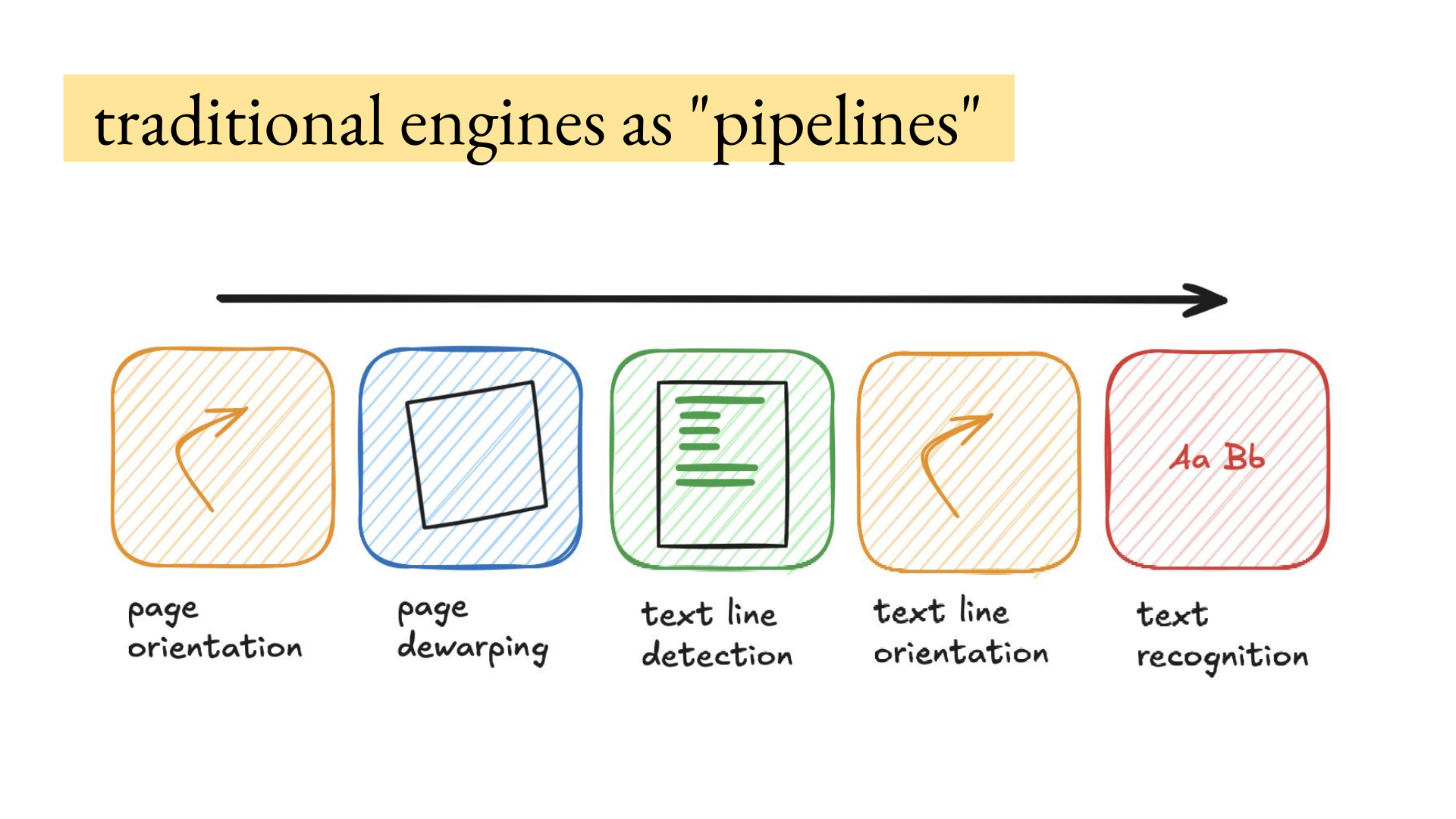
Hey, How to get data out of documents is the most common thing I get asked about privately, because if the source data extraction is wrong everything in the product will be wrong downstream. There's so many edge cases related to the reading order, tables, images, images with text inside them, scans, handwriting that is a picture embedded in a scanned document, etc. I hosted Joe Barrow for a deep dive on VLMs (vision language models) for OCR. He has processed hundreds of millions of document...
Hey, I built a tool to help me figure out what's valuable to build and talk about. It collects questions people ask, clusters repeated problems, runs a research subagent, judges the results, then puts it in a UI for me to annotate and analyze, analyze. It inspires videos, lessons, skills, apps, libraries, product features, or experiments. Here's a bit about it, and a video walkthrough that goes into more detail: The pipeline currently has ~ 6K questions from Maven lessons, GitHub issues, X...