Every post comes from something I've done on a real project. AI tools, development approaches, how I actually build things. You're getting a curation of my taste, not takes on stuff I don't use. Subscribers also get extras: things that went wrong, how my thinking about AI is changing, hacky workflows I use every day, and the occasional personal update. Stuff I share with subscribers because it's a little too personal or unpolished to blast across the internet.
eight ways products solve ambiguous AI requests
|
Hey, I often see people struggling because users have different preferences and it's had to get what exactly they want out of them. This leads the agent (and your product) to give an answer that isn't what the user wants. I gave a talk and did a writeup on query disambiguation in the community. It covers patterns from AnkiHub, AI2 Paper Finder, NotebookLM, Deep Research, Censys, Lovable, Spiral, and Codex. Read or watch the post on the web. Isaac Query DisambiguationRead or Watch the talk on the web: Here The missing context behind a simple request“Make a workout for me.” To give that user a good response, a lot of information has to go into it. We may need to know:
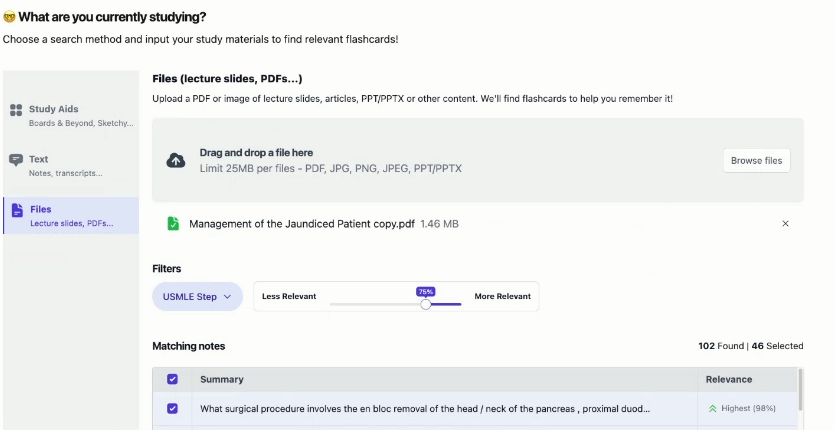
There’s a ton of information that we need to get out of the user in order to answer the simple question. Some of this can be answered by your product. Couch to 5K knows users are training for their first 5K because their entire product is focused around that. So they can make a lot of assumptions immediately. In other cases, like Chat GPT, you can’t make those assumptions. The product still has to get this context from somewhere in order to give a good answer. When a trace produces a bad output, I first determine whether the model generated something poorly or followed a reasonable assumption that the user did not share. The first may require a better prompt. The second requires more context. Products can gather that context before the request, during the agent loop, or from the user’s reaction to early results. Product patterns for disambiguationLet the user set relevanceAnkihub provides relevant flashcards to medical students. Students can upload a powerpoint from a lecture, type text, or upload PDF notes or book sections. But different students want different results. Some want only the flashcards explicitely mentioned in the material. And some want related topics that aren’t covered but might make sense to study at the same time anyway. In AnkiHub’s operator review, domain-expert annotators said their judgments could vary by as much as 90%, depending on how they interpreted the query. That kind of disagreement is a signal to inspect the interpretation before changing the model or prompt. AnkiHub uses a slider that lets users set how strong the relevance should be. The problem is that the difference between 75% and 50% may not be obvious. What do those numbers mean in your product? Use sliders when you need them, but not by default. Sliders work well for ankihub because students will find the settings they like as they upload dozens of lectures per week.
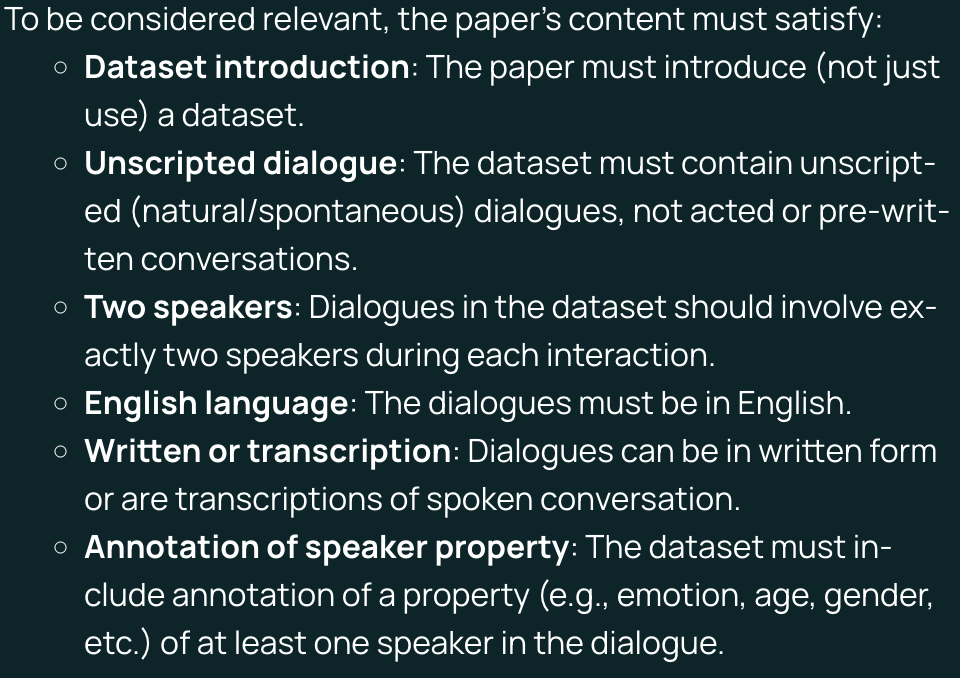
Make the relevance criteria visibleAi2’s Paper Finder shows what it considers relevant after a search. It breaks the query into criteria such as dataset introduction, unscripted dialogue, two speakers, and English language. Each result gets a green, orange, or red marker for each criterion. This shows the user how the system interpreted the query and how each result maps to it. If a result is wrong, the user can see what the system misunderstood, sort the results, and refine the next query instead of guessing.
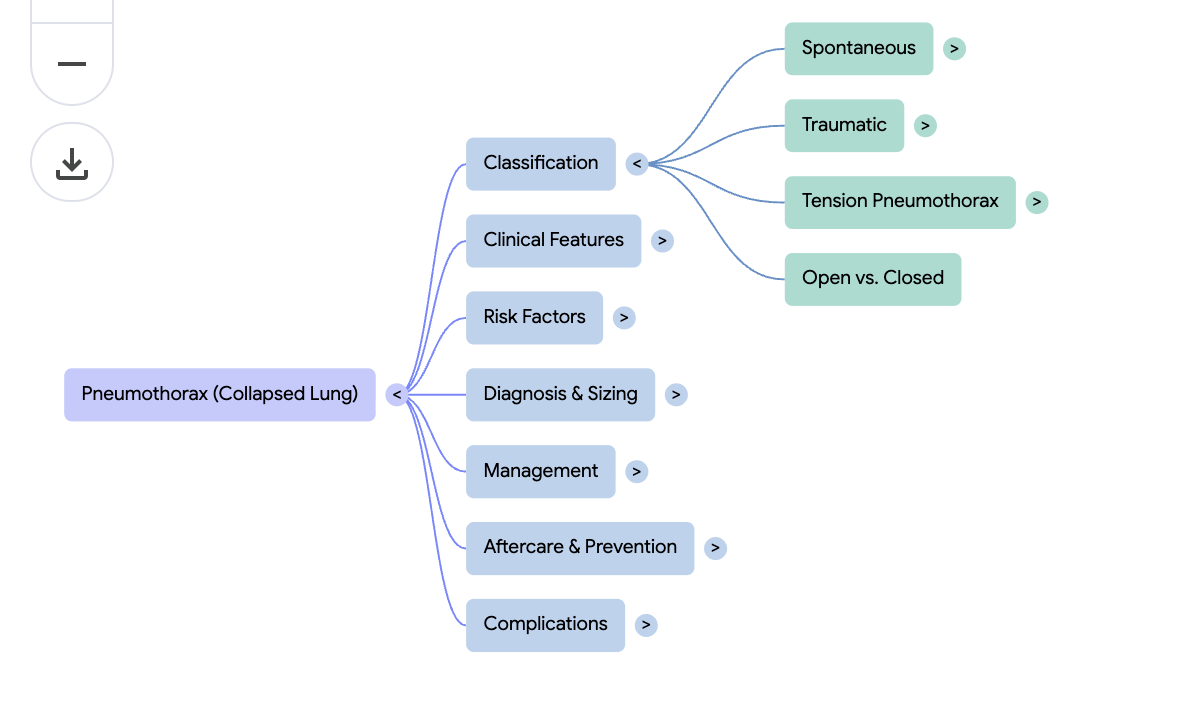
Give the user a mapNotebookLM can turn one or more uploaded documents into a map of categories and topics. You can expand a category and select a topic to scope the query. Instead of forcing me to write a precise question about a document I may not understand, it shows me how the document is organized and lets me point to the part I want.
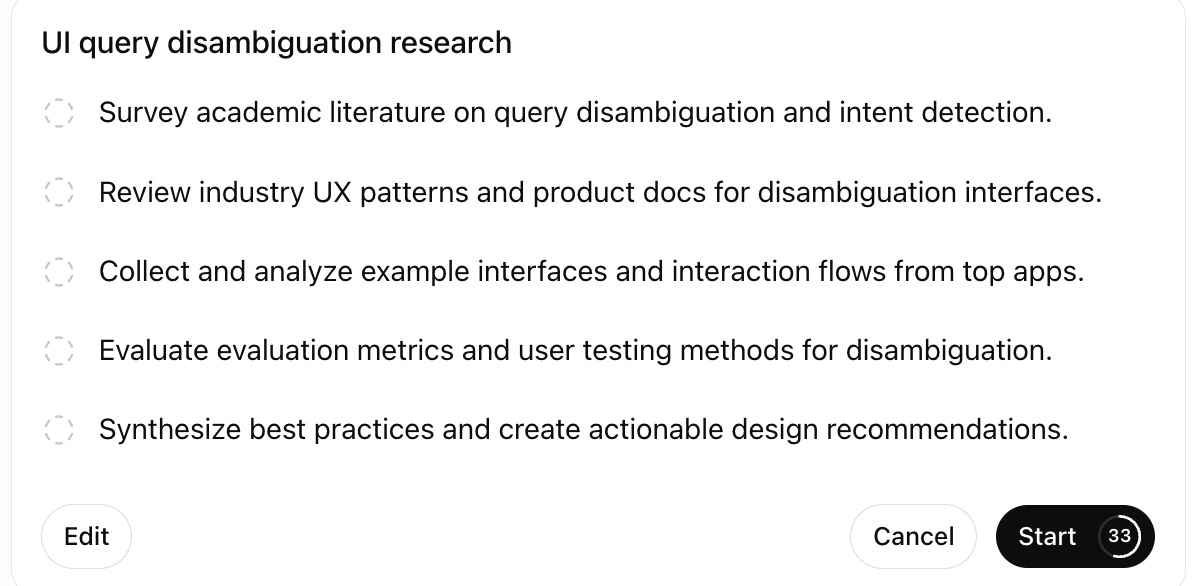
Show the plan before a long runOpenAI Deep Research creates an editable plan before it runs. It might propose querying the literature, looking for UX patterns, collecting sources, and examining evaluation methods. If it misunderstood me, I can edit or cancel the plan before starting the research. Putting the interpretation up front makes sense for a long-running task. A quick check can keep the user and the product from spending 5+ minutes on work on the wrong thing.
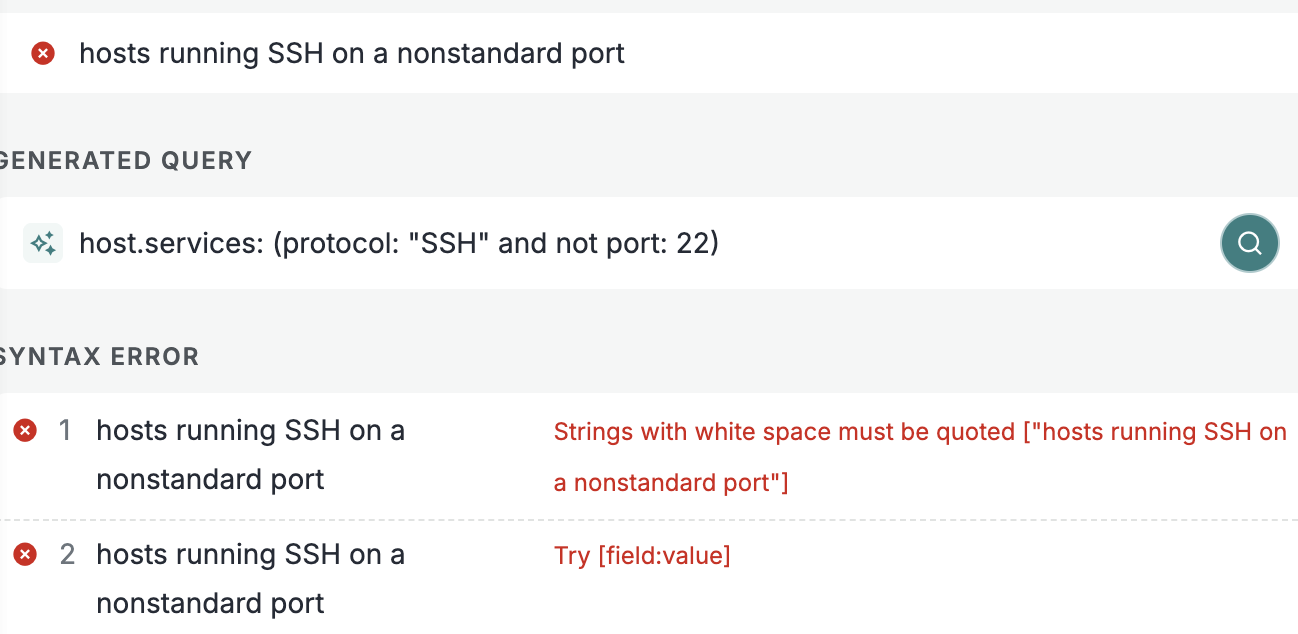
Compile natural language into a queryCensys lets technical users enter plain English, such as “hosts running SSH on a nonstandard port,” and compiles it into a structured query. I can see that it interpreted “nonstandard” to mean “not port 22” and confirm that interpretation before searching.
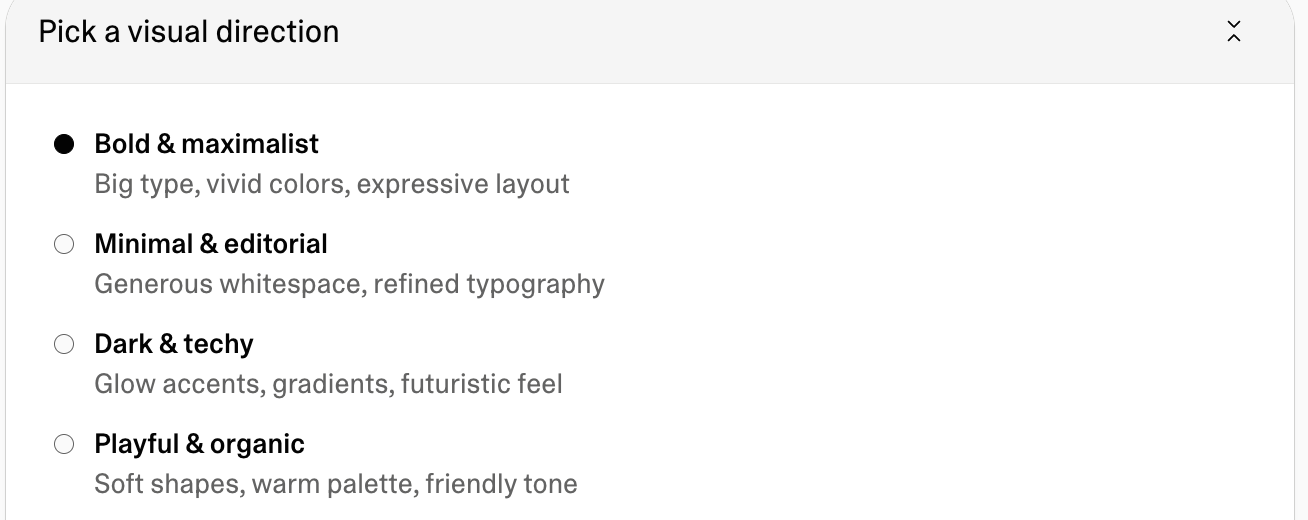
Ask for missing information in the loopI asked Lovable to create a beautiful landing page. Before generating it, Lovable asked what product the page was for and let me type an answer. Then it gave me options for visual direction, which may help someone who deoesn’t know how to describe a visual style. I like this better than putting a large form before the first request. The flow says, “Put in whatever you want. It’s okay if it’s underspecified.” The agent finds what is missing and asks only the relevant questions.
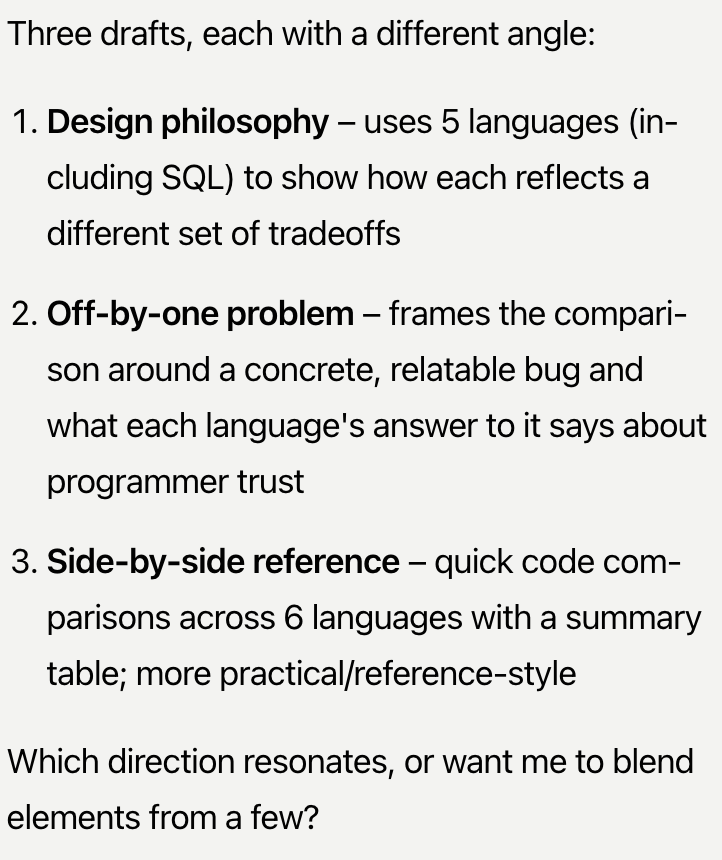
Generate several directionsI asked Spiral to write an article about loops in different programming languages. It returned three quick drafts with different angles: design philosophy, an off-by-one problem, and a side-by-side comparison. I could click one to read it in detail and pick. Instead of asking enough questions to produce one polished draft, Spiral lets the user react to several directions. The user can choose one, give more instructions, or ask it to blend them.
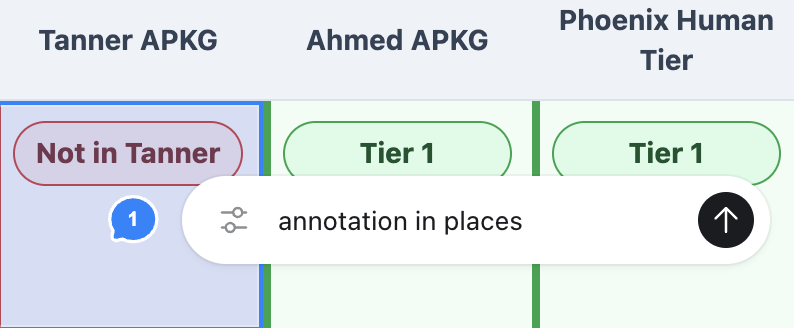
Let the user pointA common request about a rendered page is, “For this table, I don’t want it to have so much color.” If the page contains several tables, describing the location can be imprecise. The Codex app lets you click an HTML element, attach a note, and send both to the agent. Pointing is easier than describing the location and ensures the model knows which part of the page I mean.
Decide where to collect the contextIf the missing information will matter repeatedly, collect it during onboarding or save it as a default. If it is specific to the current request, ask in the loop with a text box, a small set of choices, or several sample outputs. Too many fields, buttons, and sliders make the product clunky, so make the correction as easy as possible. Keep inspecting traces for reasonable interpretations that did not match what the user meant. Those are ambiguity errors, and they show you what the product still needs to learn or ask. QuestionsWhat about e-commerce search?
Question: The examples so far are chat applications that can ask follow-up questions. What about e-commerce or delivery search, where the query is still ambiguous but a long agent loop may not fit? Some personal data can be saved instead of requested every time. If I am searching for pants, the site could already know my size and gender. That can come from onboarding, but a store with Amazon’s scope cannot ask 150 questions about every kind of product. Without an agent loop, you are limited to information collected before the request and controls such as text boxes, filters, and sliders. Navigation also provides context. An agentic search could go further and show three or four examples for the user to choose among. But, the extremely broad scope still makes disambiguation difficult, so Amazon relies on a fast search loop. Result presentation helps. Paper Finder exposes its criteria, and Amazon exposes product images, so users can scan many results and see a mismatch quickly. If I search for tables and see only coffee tables, my next query becomes “dining room table.” That is much less frustrating than opening a bunch of results before discovering the same mismatch. How do you handle a topic change over email?
Question: How should an agent handle a user who changes topics in the middle of an email thread, where you cannot present the same UI controls? Could a small model detect the change and ask whether to start a new thread without feeling robotic? Warp did something similar. It is part terminal and part agent CLI, so it detects whether an input is a shell command or an agent request. It could also notice a topic change and recommend starting a new thread. Email makes this harder because each turn may take a minute or a day. You want to limit follow-up questions, and sending the user to a form may feel awkward. I would detect the probable topic change without creating a new thread, because two requests that look unrelated can share context. For example, someone discussing a talk might suddenly ask for a VSL strategy because they want to promote that talk. The agent could say, “It looks like you moved from this topic to that one. I’ll answer the new question.” If the topics are related, the user can clarify the connection, and the user doesn’t have to re-explain the context. Cheap models already name threads in tools such as Claude Code, Codex, and Amp, so the same kind of classification could support this behavior. Can memory reduce repeated questions?
Question: I am building a product for CPAs, and research assistants keep asking the same questions without getting to know me. Have you seen anyone use memory well enough to reduce those repeated menus? I have not seen a commercial product where I love how the memory works. You can create skills automatically, template prompts, or retrieve stored context, and retrieval has improved. But preferences change over time and between projects. My writing style for a public blog post is intentionally different from how I write inside the community. Memory is another word for retrieval (find the right context at the right time). And when context is completely auto-generated without any human intervention it tends to get worse over time. What should be deleted and when? What should be updated? Which pieces are more important than others in case on conflicts? |
Isaac Flath
Every post comes from something I've done on a real project. AI tools, development approaches, how I actually build things. You're getting a curation of my taste, not takes on stuff I don't use. Subscribers also get extras: things that went wrong, how my thinking about AI is changing, hacky workflows I use every day, and the occasional personal update. Stuff I share with subscribers because it's a little too personal or unpolished to blast across the internet.

I’ve been working on extracting data from documents, and I've shared a bunch to of stuff on the topic Hosted talks on OCR and VLMs to get tables, text, images, etc. out of documents Mini examples of which models and pipelines work in specific cases Retrieval on PDF documents to grab specific source data Antaripa Saha worked on #3 as part of her work in the AI Product Engineering Club. She compared keyword search, dense OCR, visual embeddings, multivectors, and reranking on complex financial...
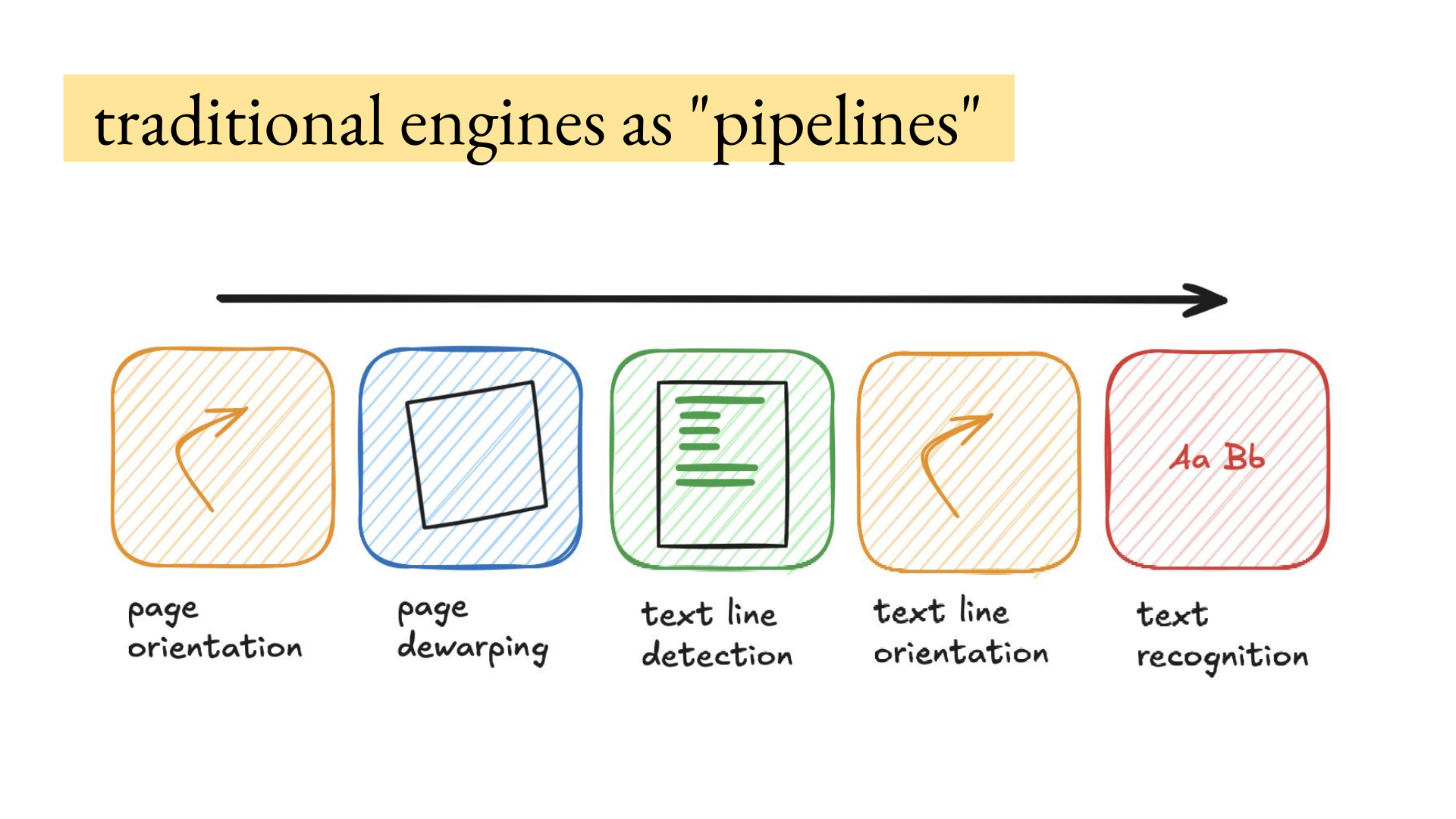
Hey, How to get data out of documents is the most common thing I get asked about privately, because if the source data extraction is wrong everything in the product will be wrong downstream. There's so many edge cases related to the reading order, tables, images, images with text inside them, scans, handwriting that is a picture embedded in a scanned document, etc. I hosted Joe Barrow for a deep dive on VLMs (vision language models) for OCR. He has processed hundreds of millions of document...
Hey, I built a tool to help me figure out what's valuable to build and talk about. It collects questions people ask, clusters repeated problems, runs a research subagent, judges the results, then puts it in a UI for me to annotate and analyze, analyze. It inspires videos, lessons, skills, apps, libraries, product features, or experiments. Here's a bit about it, and a video walkthrough that goes into more detail: The pipeline currently has ~ 6K questions from Maven lessons, GitHub issues, X...