Every post comes from something I've done on a real project. AI tools, development approaches, how I actually build things. You're getting a curation of my taste, not takes on stuff I don't use. Subscribers also get extras: things that went wrong, how my thinking about AI is changing, hacky workflows I use every day, and the occasional personal update. Stuff I share with subscribers because it's a little too personal or unpolished to blast across the internet.
two ai workflows. 1 practical, 1 experimental
|
Hey this is Isaac, Here are a couple demos of things I thought were cool. Then an update on a new project i'm working on with Hamel Husain. First, I’ve been working on Raw2Draft (my writing tool). I just added D3 diagrams to markdown and html text editing and I use one or the other most working hours. D3 is a low level visualization library that gives maximum flexibility but is very painful to write. But agents write D3 surprisingly well and it's amazing for adding visuals to help with clarity and thinking through a problem.
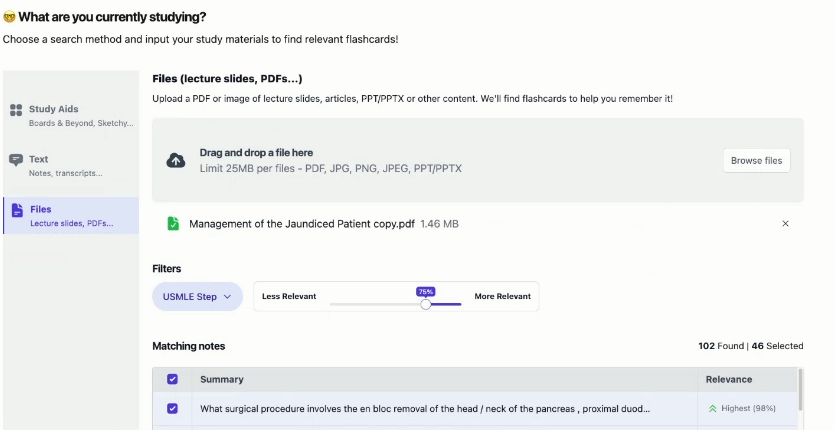
Second, the experiment. I’m working on an agent memory system backed by Anki (spaced repetition flashcards). I want a memory system where I learn alongside my agents. When the agent finds a useful pattern, correction, or gap in my understanding, that can become a card I review later instead of disappearing i nto the chat transcript. This gives me something to study, provides memory of that to my agent, and creates a clear review surface.
I’ll keep sharing personal experiments like this publicly. But as anyone building AI products knows, getting from experiment to a reliable and desirable production tool is much harder. To help builders actually solve those gaps, most of my time is shifting from SpecStory to a paid community (the Advanced AI Engineering Club) I’m running with Hamel Husain. Inside the community, Hamel and I will be doing weekly deep dives on topics like retrieval, memory, evals, and agents with real prod architectures. We'll also do operator reviews where members bring their product, evals, and logs to get blunt, tactical feedback on where reliability will break. For example last week the founder of Ankihub showed the product, evals, and current focus and we diagnosed his bottlenecks relating to annotator alignment and query disambiguation live with the community. This means I can focus completely on creating the most complete walkthroughs, live builds, and direct feedback (the first community deep dive is tomorrow!). If that is useful for what you’re building, you can see more details here. If you’re here for the public writing, keep reading. I’ll still be here. p.s. We'll be doing a free public talks as a sample of kind of deep dives we'll do weekly in the community. Hope to see you in the Tool Architectures (1500+ signup already) one or the Better RAG with Late Interaction one. Otherwise here's a sample of some of the topics we'll cover in the community, tough we will adapt based on what problems members are facing in practice. Thanks, Isaac |

Isaac Flath
Every post comes from something I've done on a real project. AI tools, development approaches, how I actually build things. You're getting a curation of my taste, not takes on stuff I don't use. Subscribers also get extras: things that went wrong, how my thinking about AI is changing, hacky workflows I use every day, and the occasional personal update. Stuff I share with subscribers because it's a little too personal or unpolished to blast across the internet.

I’ve been working on extracting data from documents, and I've shared a bunch to of stuff on the topic Hosted talks on OCR and VLMs to get tables, text, images, etc. out of documents Mini examples of which models and pipelines work in specific cases Retrieval on PDF documents to grab specific source data Antaripa Saha worked on #3 as part of her work in the AI Product Engineering Club. She compared keyword search, dense OCR, visual embeddings, multivectors, and reranking on complex financial...
Hey, I often see people struggling because users have different preferences and it's had to get what exactly they want out of them. This leads the agent (and your product) to give an answer that isn't what the user wants. I gave a talk and did a writeup on query disambiguation in the community. It covers patterns from AnkiHub, AI2 Paper Finder, NotebookLM, Deep Research, Censys, Lovable, Spiral, and Codex. Read or watch the post on the web. Isaac Query Disambiguation Read or Watch the talk on...
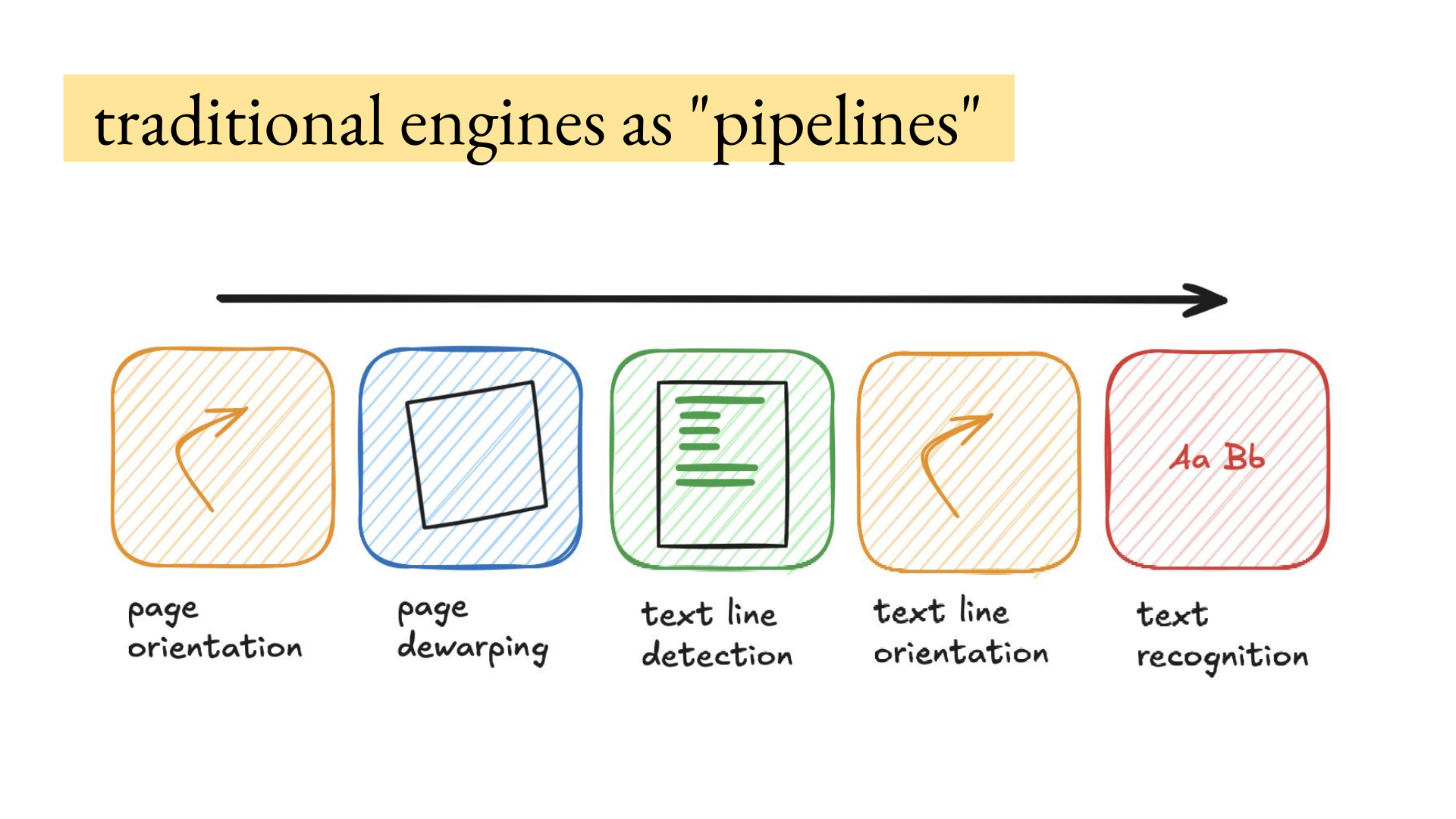
Hey, How to get data out of documents is the most common thing I get asked about privately, because if the source data extraction is wrong everything in the product will be wrong downstream. There's so many edge cases related to the reading order, tables, images, images with text inside them, scans, handwriting that is a picture embedded in a scanned document, etc. I hosted Joe Barrow for a deep dive on VLMs (vision language models) for OCR. He has processed hundreds of millions of document...